PHPとMySQL でページネーションを作成する
2025年1月2日
composer install
index.php
<?php
include "db-backend.php";
?>
<!DOCTYPE html>
<html lang="en">
<head>
    <meta charset="UTF-8">
    <meta name="viewport" content="width=device-width, initial-scale=1.0">
    <title>ページネーション</title>
    <link href="https://cdn.jsdelivr.net/npm/bootstrap@5.3.0/dist/css/bootstrap.min.css" rel="stylesheet">
    <style>
        ul.pagination .page-link {
  border: 1px solid #666;
  background: white;
  color: #333;
  font-weight: bold;
}
.container{
    height: 80vh;
    color: --bs-warning-bg-subtle;
    background: --bs-warning-bg-subtle;
}
.table{
    font-size: 22px;
}
.sw{
    padding: 20px 20px;
    margin: 10px auto;
    height: 5vh;
    font-size: 24px;
}
a.page-link.disable{
    color: #ccc;
}
a.page-link.active{
    color:#ccc;
    background: blue;
}
    </style>
</head>
<?php
if (isset($_GET['page'])) {
    $id = $_GET['page'];
}else{
    $id =1;
}
?>
<body id="<?=$id?>">

<div class="container mt-5  mb-5">
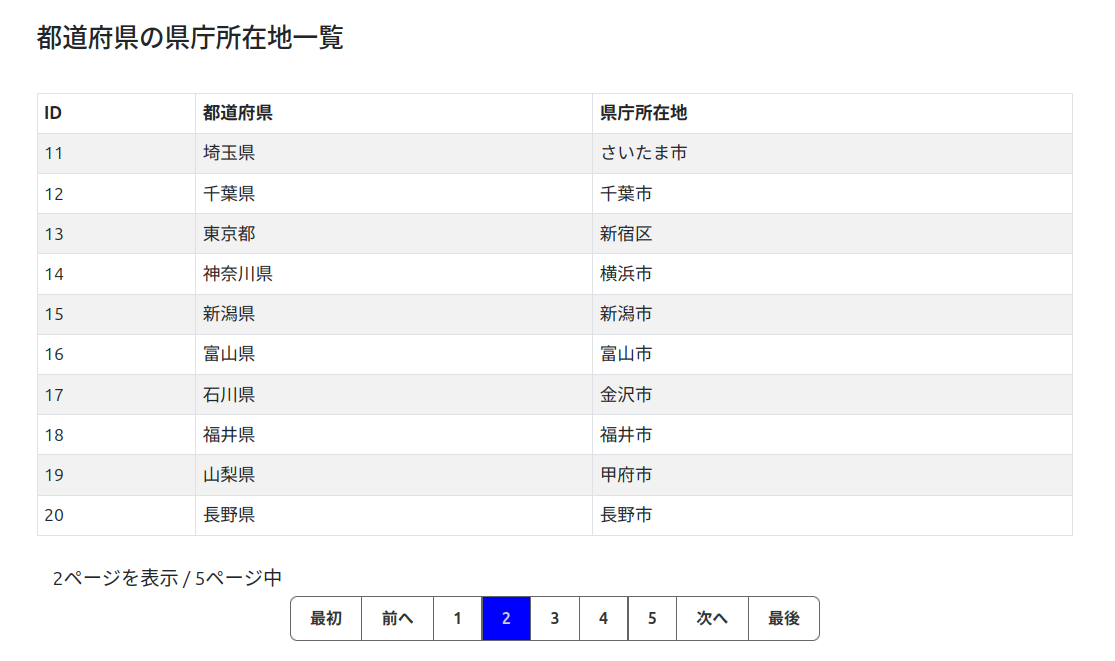
  <h2>都道府県の県庁所在地一覧</h2>

  <table class="table table-bordered mt-5 table-striped">
    <thead>
      <tr>
        <th>ID</th>
        <th>都道府県</th>
        <th>県庁所在地</th>
      </tr>
    </thead>
    <tbody>
        <?php while($row = $result->fetch_assoc()) {?>
      <tr>
        <td><?=trim($row['id'])?></td>
        <td><?=trim($row['prefectures'])?></td>
        <td><?=trim($row['Prefectural_office'])?></td>
    </tr>
    <?php } ?>

    </tbody>
  </table>

  <nav aria-label="Page navigation example">
    <?php if (!isset($_GET['page'])) {
        $page = 1;
    } else {
        $page = $_GET['page'];
    } ?>
    <div class="sw"> <?=$page?>ページを表示 / <?=$pages?>ページ中 </div>
  <ul class="pagination  pagination-lg justify-content-center">

        <?php if (isset($_GET['page']) && $_GET['page'] > 1) { ?>
            <li class="page-item"><a class="page-link" href="?page=1">最初</a></li>
            <li class="page-item"><a class="page-link" href="?page=<?=$_GET['page'] -1 ?>">前へ</a></ll>
        <?php } else { ?>
            <li class="page-item"><a class="page-link disable">最初</a></li>
            <li class="page-item"><a class="page-link disable">前へ</a></li>
        <?php } ?>
       <?php for ($conuter=1; $conuter <= $pages; $conuter ++) { ?>
    <li class="page-item page-number"><a class="page-link" href="?page=<?=$conuter?>"><?=$conuter?></a></li>
    <?php } ?>


        <?php if (!isset($_GET['page'])) { ?>
            <a class="page-link" href="?page=2">次へ</a>
            <?php } else {
                if ($_GET['page'] >= $pages){ ?>
            <li class="page-item"><a class="page-link disable">次へ</a></li>
            <li class="page-item"><a class="page-link disable">最後</a></li>
            <?php } else { ?>
            <li class="page-item"><a class="page-link" href="?page=<?=$_GET['page'] +1 ?>">次へ</a></li>
            <li class="page-item"><a class="page-link" href="?page=<?=$pages?>">最後</a></li>

    <?php } }?>

  </ul>
</nav>
</div>
<script>
   let links = document.querySelectorAll('.page-number >a');
   let bodyId = parseInt(document.body.id) - 1;
   links[bodyId].classList.add("active");

</script>
<script src="https://cdn.jsdelivr.net/npm/bootstrap@5.3.0/dist/js/bootstrap.bundle.min.js"></script>
</body>
</html>
db-backend.php
1ページに表示する件数を変数にセット $rows_per_page = 10;
テーブルの件数を行数を取得 -- 19行目(num_rows)
総ページ数を求める 切り捨て(テーブル件数 / 1ページ表示件数)
index.phpからの呼び出しにページごとにSQL文LIMITを値を変える
1ページ目
SELECT * FROM prefectures LIMIT 0, 10
2ページ目
SELECT * FROM prefectures LIMIT 11, 20
3ページ目
SELECT * FROM prefectures LIMIT 21, 30
4ページ目
SELECT * FROM prefectures LIMIT 31, 40