PHP MYSQL - パスワードリセット PHPMailer・mailtrap
2025年7月14日
index.php 2行目 データベースに接続するファイルを読み込む 4行目-25行目 インポート結果を表示させるPHPプログラムコード $_GET['status']をIF関数判定して空でなければ、SWITCH関数にてインポート処理結果を変数へ代入 インポートを行った場合、必ず変数へ代入される。 switch関数による値の切り替え 表示させるメッセージ変数 : $statusMsg divクラスに代入する値により色を変えるための変数 : $statusType 45行目にメッセージを表示する 77行目-92行目 birdsテーブルをSELECT文クエリー、件数が0より多ければWHILE文を処理をして一件ずつ最終列までテーブルのタグ内に変数を代入する 、「件数が0ならデータが見つかりません」と表示する。
ファイル構成./
├── ajaxfile.php
├── config.php
├── create.php
├── delete.php
├── edit.php
├── index.php
├── js/
│   ├── preview.js
│   └── view.js
└── upload_image/
    ├── 25037829_s.jpg
    ├── 29249442_s.jpg
[index.php] 登録したデータ表示、Bootstrap5 CDNとデータテーブル、JQUERY3.7を利用している
[config.php] MYSQLデータベースへの接続情報 を書いています
[create.php] フォームからMYSQLデータベースへ接続して挿入クエリーを実行
[delete.php] 削除ボタンをクリックした後、IDに紐付いたレコードを(WHERE = ID)一行削除 を行う
[delete.php] 登録したデータ表示
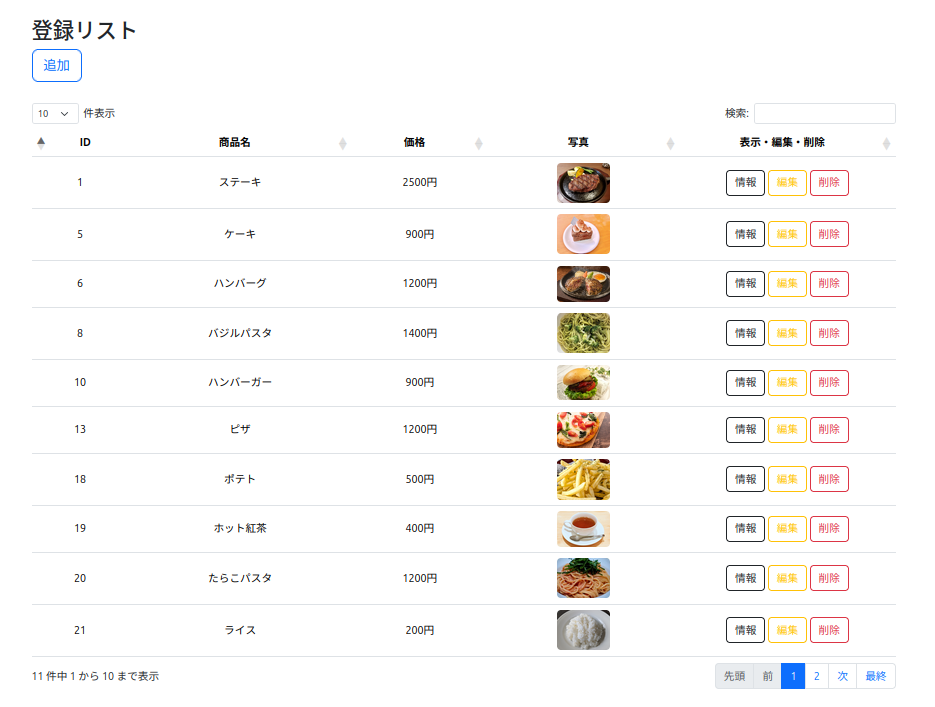
config.php
<?php
    $server = "localhost";
    $username = "root";
    $password = "";
    $database = "myshop";

    $conn = new mysqli($server, $username, $password, $database);

    if ($conn->connect_error) {
        die("Connection failed: " . $conn->connect_error);
    }
?>
index.php
<?php
session_start();
?>
<!DOCTYPE html>
<html lang="ja">
<head>
    <meta charset="UTF-8">
    <meta name="viewport" content="width=device-width, initial-scale=1.0">
    <link href="https://cdn.jsdelivr.net/npm/bootstrap@5.3.3/dist/css/bootstrap.min.css" rel="stylesheet">
    <link rel="stylesheet" href="https://cdnjs.cloudflare.com/ajax/libs/twitter-bootstrap/5.3.3/css/bootstrap.min.css">
    <link rel="stylesheet" href="https://cdn.datatables.net/2.3.2/css/dataTables.bootstrap5.css">
    <script src="https://code.jquery.com/jquery-3.7.1.js"></script>
    <script src="https://cdnjs.cloudflare.com/ajax/libs/twitter-bootstrap/5.3.3/js/bootstrap.bundle.min.js"></script>
    <script src="https://cdn.datatables.net/2.3.2/js/dataTables.js"></script>
    <script src="https://cdn.datatables.net/2.3.2/js/dataTables.bootstrap5.js"></script>
    <style>
      td{ text-align: center;  }
    </style>
    <script>
$(document).ready(function() {
    $('#example').DataTable({
        "language": {
            "url": "https://cdn.datatables.net/plug-ins/1.10.16/i18n/Japanese.json"
        },

    });
});
    </script>

    <title>My Shop</title>
</head>
<body>

    <div class="container my-5 w-75">
        <br>
        <h2>登録リスト</h2>
        <a href="create.php" class="btn btn-outline-primary btn-lg" role="button">追加</a>
        <br>
        <br>
          <?php
            if (!empty($_SESSION["success"])) { ?>
                <div class="row mb-3">
                    <div class="offset-sm-0 col-sm-12">
                        <div class="alert alert-primary alert-dismissible fade show" role="alert">
                            <strong><?= $_SESSION["success"]  ?></strong>
                            <button type="button" class="btn-close" data-bs-dismiss="alert" aria-label="close"></button>
                        </div>
                    </div>
                </div>
            <?php } ?>
        <table id="example" class="table table-hover  w-100">
            <thead>
                <tr>
                    <th class="text-center">ID</th>
                    <th  class="text-center">商品名</th>
                    <th class="text-center">価格</th>
                    <th class="text-center">写真</th>
                    <th class="text-center">表示・編集・削除</th>
                </tr>
            </thead>
            <tbody>
<?php
include "config.php";

$sql = "SELECT * FROM products";
$result = $conn->query($sql);

if (!$result) {
    die("Invalid query: " . $conn->error);
}
while ($row = $result->fetch_assoc()) { ?>

    <tr>
        <td  class="align-middle text-center"><?= $row['id']?></td>
        <td  class="align-middle"><?= $row['name']?></td>
        <td  class="align-middle"><?= $row['price']?></td>
        <td  class="align-middle h-auto">
          <img class="rounded mx-auto d-block h-auto" src="upload_image/<?= $row['image']?>" width="80" alt="">
        </td>
        <td class="align-middle w-25">
            <a data-id='<?= $row['id']?>' class="userinfo btn btn-outline-dark">情報</a>
            <a href="edit.php?id=<?= $row['id']?>" class="btn btn-outline-warning">編集</a>
            <a href="delete.php?id=<?= $row['id']?>" class=" btn btn-outline-danger">削除</a>
        </td>
    </tr>
<?php } ?>

            </tbody>
        </table>
    </div>

<?php
unset($_SESSION["success"]);
?>
<div class="modal fade" id="empModal" role="dialog">
  <div class="modal-dialog">
    <div class="modal-content">
      <div class="modal-header">
        <h4 class="modal-title ">アイテム情報</h4>
         <button type="button" class="btn-close" data-bs-dismiss="modal" aria-label="Close"></button>
      </div>
      <div class="modal-body"></div>
      <div class="modal-footer">
         <button type="button" class="btn" data-bs-dismiss="modal">閉じる</button>
      </div>
    </div>
  </div>
</div>

<script src="js/preview.js"></script>
<script src="js/view.js"></script>
<script src="https://cdn.jsdelivr.net/npm/bootstrap@5.3.3/dist/js/bootstrap.bundle.min.js"></script>
</body>
</html>

</body>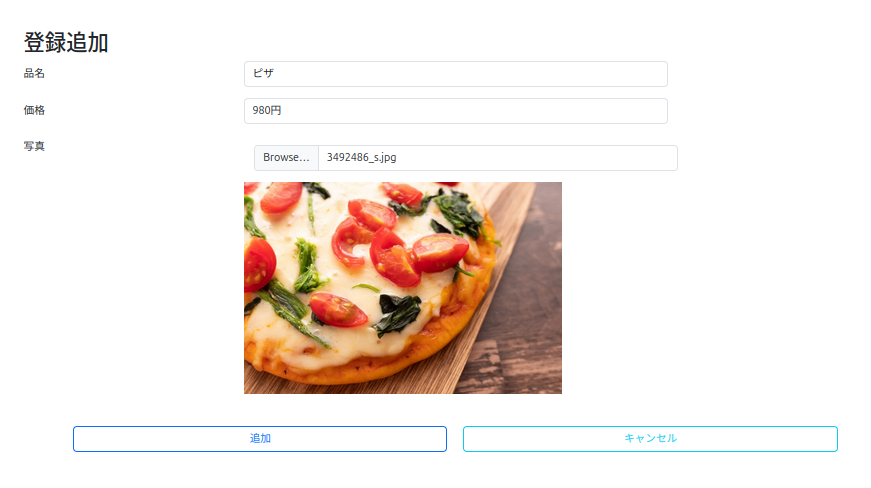
create.php
<?php
session_start();
include "config.php";

$errorMessage = "";

if ($_SERVER['REQUEST_METHOD'] == 'POST') {
    $name = $_POST["name"];
    $price = $_POST["price"];

    $image =  $_FILES['image']['name'];
    $image_tmp_name = $_FILES['image']['tmp_name'];
    $image_folder = 'upload_image/' . $image;


    do {
        if (empty($name) || empty($price) || empty($image)) {
            $errorMessage = "未入力が存在します";
            break;
        }
         $sql = "INSERT INTO products (name, price, image) " .
                "VALUES ('$name', '$price', '$image')";
                $result = $conn->query($sql);
                if (!$result) {
                    $errorMessage = "Invalid query " . $conn->error;
                    break;
                }

        if (move_uploaded_file($image_tmp_name, $image_folder)) {
        $_SESSION["success"] = "データを追加しました";
            header('Location: ./index.php?success=アップロード成功');
            exit;
        } else {
            header('Location: ./index.php?error=アップロードに失敗しました。');
            exit;
        }

    } while (false);
}
?>

<!DOCTYPE html>
<html lang="ja">
<head>
    <meta charset="UTF-8">
    <meta name="viewport" content="width=device-width, initial-scale=1.0">
    <link href="https://cdn.jsdelivr.net/npm/bootstrap@5.3.3/dist/css/bootstrap.min.css" rel="stylesheet">
    <title>My Shop</title>
</head>
<body>
    <div class="container my-5 ">
        <h2>登録追加</h2>
        <?php
        if (!empty($errorMessage)) { ?>
            <div class="alert alert-warning alert-dismissible fade show" role="alert">
                <strong><?= $errorMessage ?></strong>
                <button type="button" class="btn-close" data-bs-dismiss="alert" aria-label="close"></button>
            </div>
        <?php } ?>
        <form action="" method="post" enctype="multipart/form-data">
            <div class="row mb-3">
                <label for="" class="col-sm-3 col-form-label">品名</label>
                <div class="col-sm-6">
                    <input type="text" name="name" class="form-control" value="<?= $name ?>">
                </div>
            </div>
            <div class="row mb-3">
                <label for="" class="col-sm-3 col-form-label">価格</label>
                <div class="col-sm-6">
                    <input type="text" name="price" class="form-control" value="<?= $price ?>">
                </div>
            </div>
            <div class="row mb-3">
                <label for="" class="col-sm-3 col-form-label">写真</label>
                <div class="col-sm-6">
                         <input type="file" id="image-input"  name="image"  class="form-control m-3"  accept="image/png, image/jpeg, image/jpg">
                        </div>
                         <img id="image-preview" src="#" alt="プレビュー" class="offset-sm-2 col-sm-10 img-fluid img-thumbnail w-75 mb-5">
            </div>

            <div class="row mb-3">
                <div class="offset-sm-6 col-sm-3 d-grid">
                    <button type="submit" name="" class="btn btn-outline-primary">追加</button>
                </div>
                <div class="col-sm-3 d-grid">
                    <a class="btn btn-outline-danger p-2" href="index.php">キャンセル</a>
                </div>
            </div>
        </form>
    </div>

<script src="js/preview.js"></script>
<script src="https://cdn.jsdelivr.net/npm/bootstrap@5.3.3/dist/js/bootstrap.bundle.min.js"></script>
</body>
</html>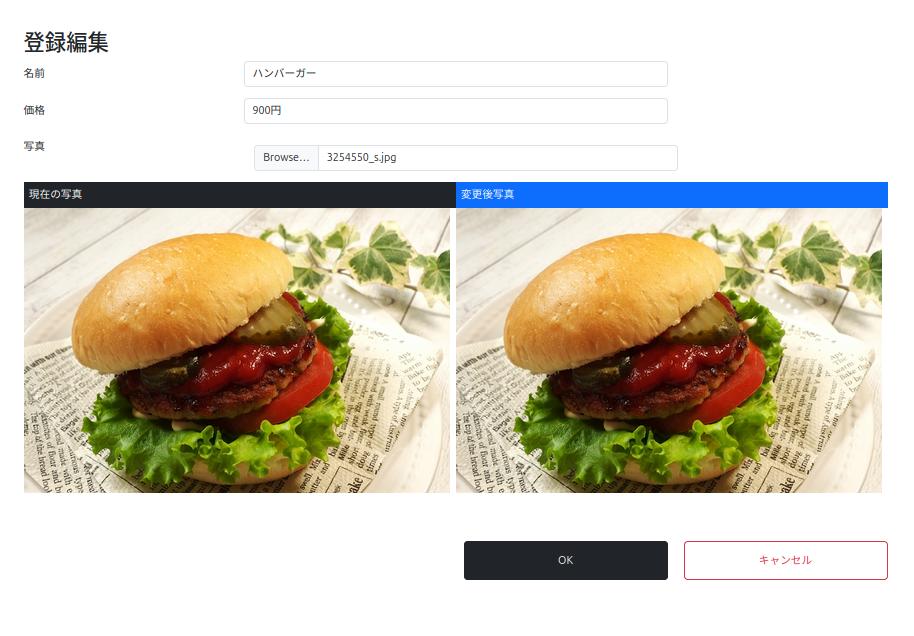
edit.php
<?php
session_start();
include "config.php";

$errorMessage = "";

    if (!isset($_GET["id"])) {
        header("location: index.php");
        exit;
    }

    $id = $_GET["id"];
    $sql = "SELECT * FROM products WHERE id=$id";

    $result = $conn->query($sql);
    $row = $result->fetch_assoc();

    if (!$row) {
        header("location: index.php");
        exit;
    }

    $name = $row["name"];
    $price = $row["price"];
    $image_before = $row["image"];
    $before_image_folder = 'upload_image/' . $image_before;

if ($_SERVER['REQUEST_METHOD'] == 'POST') {

    $id = $_POST["id"];
    $name = $_POST["name"];
    $price = $_POST["price"];
    $image =  $_FILES['image']['name'];
    $image_tmp_name = $_FILES['image']['tmp_name'];
    $image_folder = 'upload_image/' . $image;

    do {
          if (empty($id) || empty($name) || empty($price) || empty($image)) {
            $errorMessage = "未入力が存在します";
            break;
        }

        $sql = "UPDATE products " .
        "SET name = '$name', price = '$price' , image = '$image' " .
        "WHERE id = $id";

        $result = $conn->query($sql);
        if (!$result) {
            $errorMessage = "SQLエラー " . $conn->error;
            break;
        }

           if (move_uploaded_file($image_tmp_name, $image_folder)) {
            $before_image_folder = 'upload_image/' . $image_before;
            unlink("$before_image_folder");
            $_SESSION["success"] = "編集しました";
            header('Location: ./index.php?success=アップロード成功');
            exit;

        } else {
            header('Location: ./index.php?error=アップロードに失敗しました。');
            exit;
        }

    } while (true);
}
?>
<!DOCTYPE html>
<html lang="ja">
<head>
    <meta charset="UTF-8">
    <meta name="viewport" content="width=device-width, initial-scale=1.0">
    <link href="https://cdn.jsdelivr.net/npm/bootstrap@5.3.3/dist/css/bootstrap.min.css" rel="stylesheet">
    <title>My Shop</title>

</head>
<body>
    <div class="container my-5">
        <h2>登録編集</h2>
        <?php
        if (!empty($errorMessage)) { ?>
            <div class="alert alert-warning alert-dismissible fade show" role="alert">
                <strong><?= $errorMessage ?></strong>
                <button type="button" class="btn-close" data-bs-dismiss="alert" aria-label="close"></button>
            </div>
        <?php } ?>
        <form action="" method="post" enctype="multipart/form-data">
            <input type="hidden" name="id" value="<?= $id ?>">
            <div class="row mb-3">
                <label for="" class="col-sm-3 col-form-label">名前</label>
                <div class="col-sm-6">
                    <input type="text" name="name" class="form-control" value="<?= $name ?>">
                </div>
            </div>
            <div class="row mb-3">
                <label for="" class="col-sm-3 col-form-label">価格</label>
                <div class="col-sm-6">
                    <input type="text" name="price" class="form-control" value="<?= $price ?>">
                </div>
            </div>
             <div class="row mb-3">
                <label for="" class="col-sm-3 col-form-label">写真</label>
                <div class="col-sm-6 ">
                         <input type="file" id="image-input"  name="image"  class="form-control m-3"  accept="image/png, image/jpeg, image/jpg">

                </div>
                <div class="d-flex flex-row w-100 col-sm-6">

                        <div class="d-flexs flex-row w-50">
                            <span class="d-block p-2 text-bg-dark">現在の写真</span>
                            <img src="upload_image/<?=$image_before ?>" alt="" class="img-fluid mb-4">
                        </div>
                        <div class="d-flexs flex-row w-50">

                            <span class="d-block p-2 text-bg-primary">変更後写真</span>

                            <img id="image-preview" src="#" alt="プレビュー" class="img-fluid mb-4">
                    </div>
                </div>
            </div>


            <div class="row mb-5 justify-content-end mt-5">
                <div class="offset-sm-2 col-sm-5 d-grid">
                    <button type="submit" name="" class="btn btn-dark p-3">OK</button>
                </div>
                <div class="col-sm-5 d-grid">
                    <a class="btn btn-outline-danger p-3" href="index.php">キャンセル</a>
                </div>
            </div>
        </form>
    </div>
<script src="js/preview.js"></script>
<script src="https://cdn.jsdelivr.net/npm/bootstrap@5.3.3/dist/js/bootstrap.bundle.min.js"></script>
</body>
delete.php
削除ボタンをクリックした時に呼び出される。href="delete.php?id="、id値をdelete.phpへデータを送りDELETE文にWHERE条件指定削除を行う。
<?php
session_start();
if (isset($_GET["id"])) {
    $id = $_GET["id"];

    $server = "localhost";
    $username = "ubu";
    $password = "ubu";
    $database = "myshop";

    $conn = new mysqli($server, $username, $password, $database);

    $sql = "DELETE FROM products WHERE id=$id";
    $conn->query($sql);

    $_SESSION["success"] = "商品を削除しました";
}


header("Location: index.php");
exit;
?>
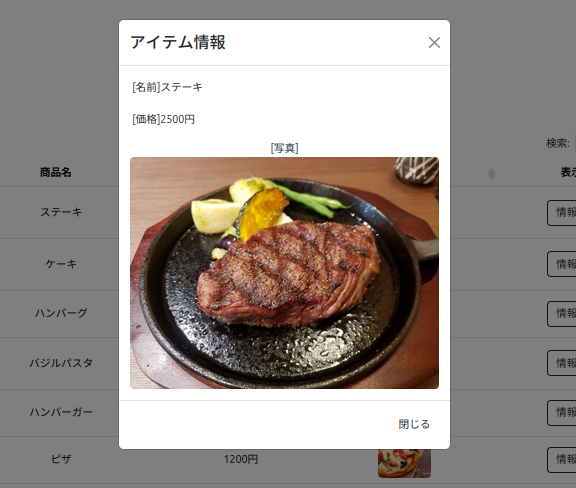
Viewボタンクリックして登録データを表示させる。
ajaxfile.php
<?php
$userid = $_POST['userid'];
 include "config.php";

$sql = "SELECT * FROM products WHERE id = $userid";
$result = $conn->query($sql);

while ($row = $result->fetch_array()) { ?>
<table border='0'>
    <tr>
        <p class="p-1  text-dark">[名前]<?= $row['name']?></p>
        <p class="p-1 text-dark">[価格]<?= $row['price']?></p>
        <div class="text-dark text-center">[写真]
            <td><img class="rounded mx-auto" src="upload_image/<?= $row['image']?>" width="100%" height="auto" alt=""></td></div>
    </tr>
</table>

<?php } ?>
preview.js
const imageInput = document.getElementById('image-input');
const imagePreview = document.getElementById('image-preview');

imageInput.addEventListener('change', function(e) {
  const file = e.target.files[0];
  if (file) {
    const reader = new FileReader();

    reader.onload = function(e) {
      imagePreview.src = e.target.result;
    }

    reader.readAsDataURL(file);
  }
});
view.js
  $('.userinfo').click(function(){
      var userid = $(this).data('id');
      $.ajax({
        url: 'ajaxfile.php',
        type: 'post',
        data: {userid: userid},
        success: function(response){
          $('.modal-body').html(response);
          $('#empModal').modal('show');
        }
      })
    });
view.php